
FALL OPEN STUDIOS 2026
Shipyard Open Studios x SF Open Studios
October 17 and 18, 2026 | 11AM - 6PM
Weekend 4 of the city-wide SF Open Studios
FALL OPEN STUDIOS 2026
Step-by-Step Registration Process
This is a new process for all of us. In order to try to make it as clear as possible we’ve created this step-by-step walkthrough, with screenshots for reference.
Reminders before we get started:
• The price is the same regardless of when you sign-up.
Shipyard Tenant: $440; Shipyard Guest $545
• To receive the maximum benefits, complete the below registration steps by May 15.
Step 1.
Complete and submit this registration form (with your single payment)—FOS26 STAR + ArtSpan Sign-up.
• This step includes making a single payment that covers fees for all 3 collaborating organizations—STAR, ArtSpan, and The Point.
Step 2.
Claim your complimentary ArtSpan membership.
Note: Directions for this step vary depending on your current membership status (Active, Expired, New).
ACTIVE USERS
1. Login to your artspan account at artspan.org/dashboard
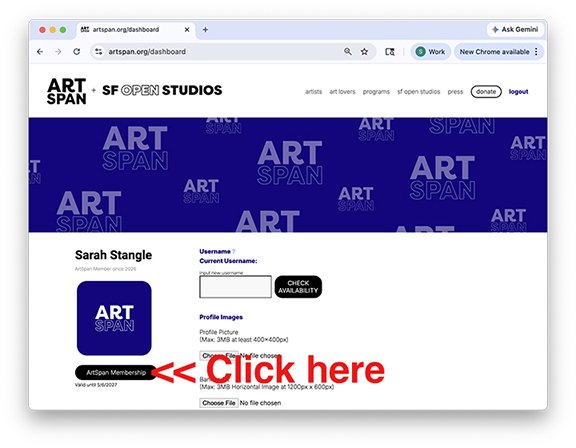
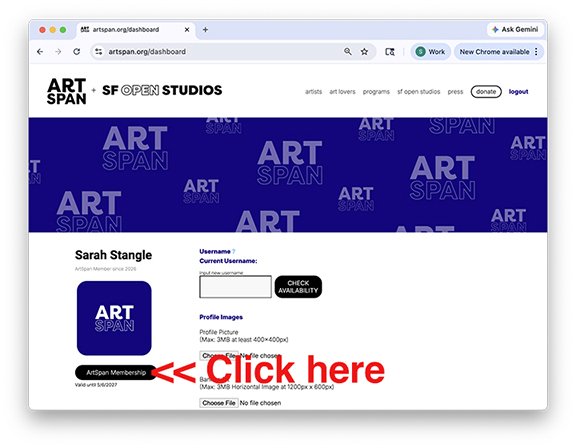
2. From your dashboard, click the “ArtSpan Membership” button on the left side of the screen
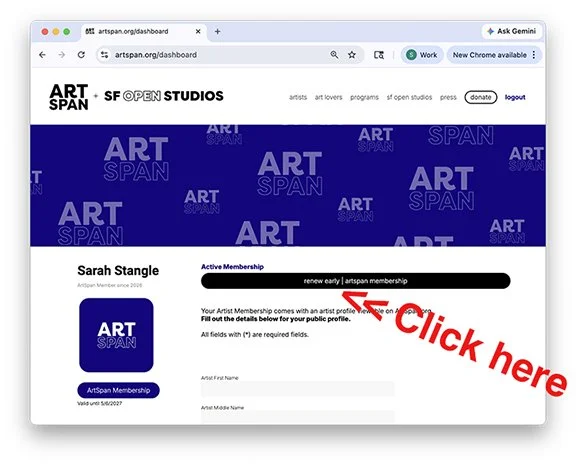
3. Click the button at the top of the screen that reads: renew early | artspan membership
4.
At the bottom of the payment fields, find the Discount Code bar and enter the code STARARTIST.
Click “Apply” — the balance should now show $0.00
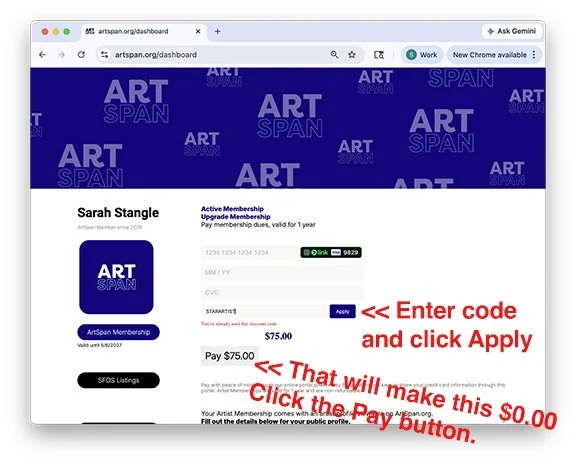
5. Click “Pay” — no need to enter credit card details
6. You should receive the following confirmation pop-up: Membership successfully updated!
EXPIRED USERS
1. Login to your artspan account at artspan.org/dashboard
2. From your dashboard, click the “Renew ArtSpan Membership” button on the left side of the screen
3.
At the bottom of the payment fields, find the Discount Code bar and enter the code STARARTIST.
Click “Apply” — the balance should now show $0.00
4. Click “Pay” — no need to enter credit card details
5. You should receive the following confirmation pop-up: Membership successfully updated!
6. Make sure to complete the required details under “Personal Info” prior to registering for SF Open Studios
NEW USERS
1. Visit artspan.org/artspanmembership
2. Fill in the required information:
a. Email
b. Password
c. Name
d. Phone Number
3. You will be prompted to login using the email and password you just created; login
4. After logging in, you will land in your artist dashboard. Click the “Renew ArtSpan Membership” button on the left side of the screen
5.
At the bottom of the payment fields, find the Discount Code bar and enter the code STARARTIST.
Click “Apply” — the balance should now show $0.00
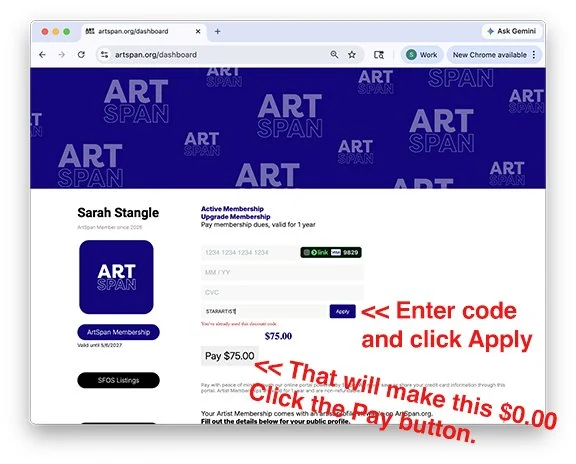
6. Click “Pay” — no need to enter credit card details
7. You should receive the following confirmation pop-up: Membership successfully updated!
8. Make sure to complete the required details under “Personal Info” prior to registering for SF Open Studios
Step 3.
Claim your SF Open Studios Registration (from your active ArtSpan account), complete your listing information, and upload your image for the catalog.
Note: In order to be eligible for the print catalog you MUST COMPLETE THIS STEP BY MAY 15.
1. While logged into your ArtSpan account, visit artspan.org/artists/sfosregistration
2. Scroll to the bottom of the page and select Premier Regular:
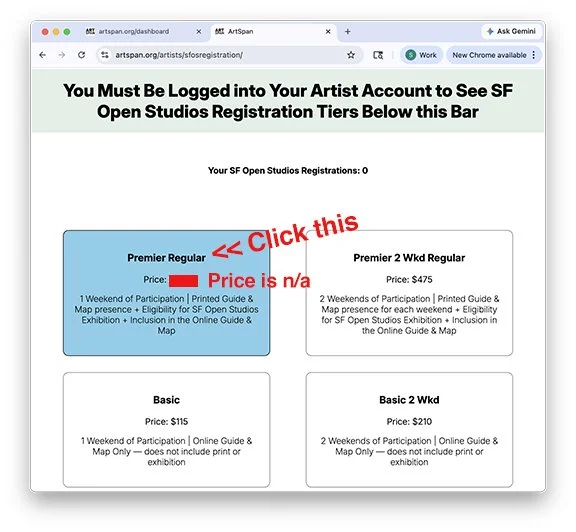
3. At the bottom of the payment fields, find the Discount Code bar and enter the code STAR100
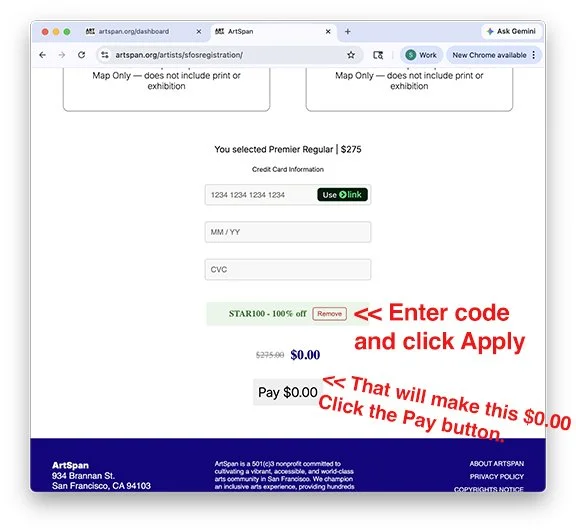
4. Click “Apply” — the balance should now show $0.00
5. Click “Pay” — no need to enter credit card details
6. You will see a confirmation message and receive an email regarding your purchase.
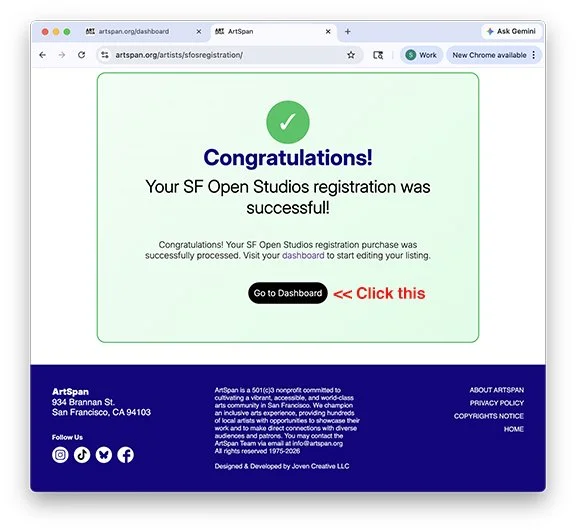
7. On the Congrats page click on Go to Dashboard. Or if you already left that page, click on the dashboard button on the top right of the webpage to begin filling out your SF Open Studios listing information
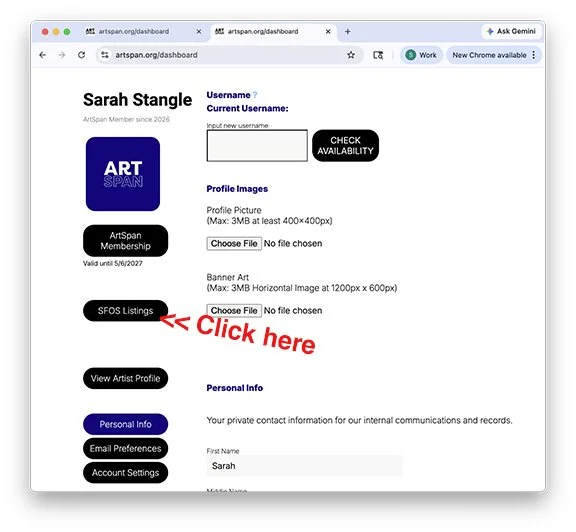
8. In your dashboard, click the “SFOS Listing(s)” on the left
9. Click the listing you’ve purchased
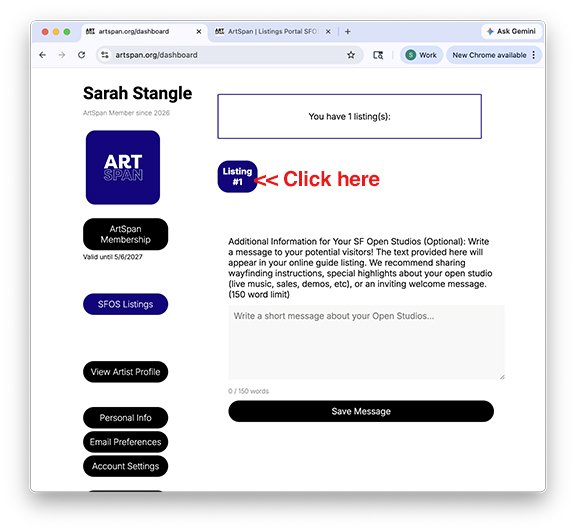
NOTE: It may take several minutes for your listing to become available. Typically, the listing is available after receiving your confirmation email. If you do not see your listing after receiving the email, please hard refresh the page (ctrl + shift + R)
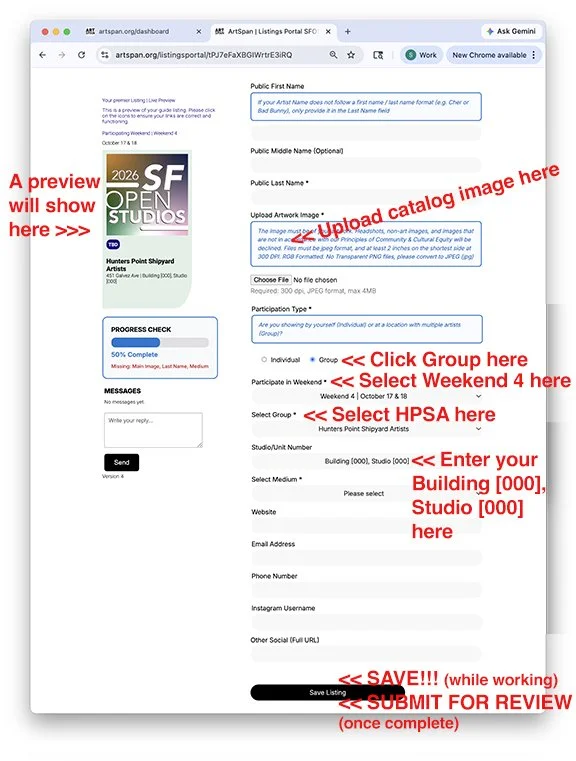
10. Read the instructions on the next screen to complete your listing information AND upload your image for the print catalog. Note: See screenshot below for some call-outs that are specific to Shipyard Artists.
Congratulations!
You’re registered for FALL OPEN STUDIOS 2026! Phew.
FALL OPEN STUDIOS 2026
How can I confirm that I’ve registered fully?
For Step 1:
• Upon completing this step, you should have receveid an email confirming that it went through.
• This step is facilitated by STAR with a STAR system. Email openstudios@shipyardtrust.org and we can confirm that you’ve completed this step.
For Step 2:
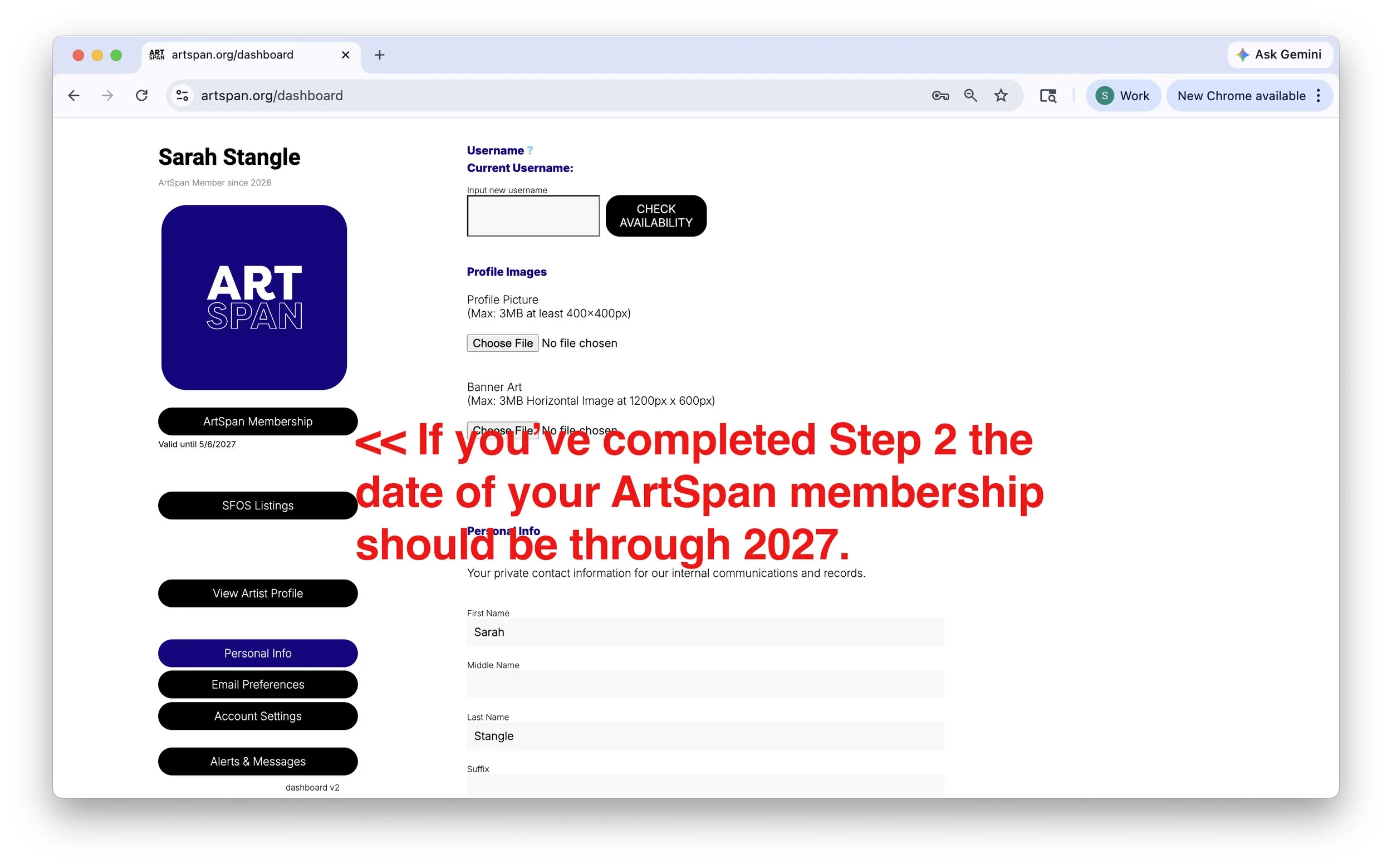
• This step is facilitated by ArtSpan on their website. We don't have visibility into it. That said, if you sign into your ArtSpan account, go to the dashboard, and look at this screen:
For Step 3:
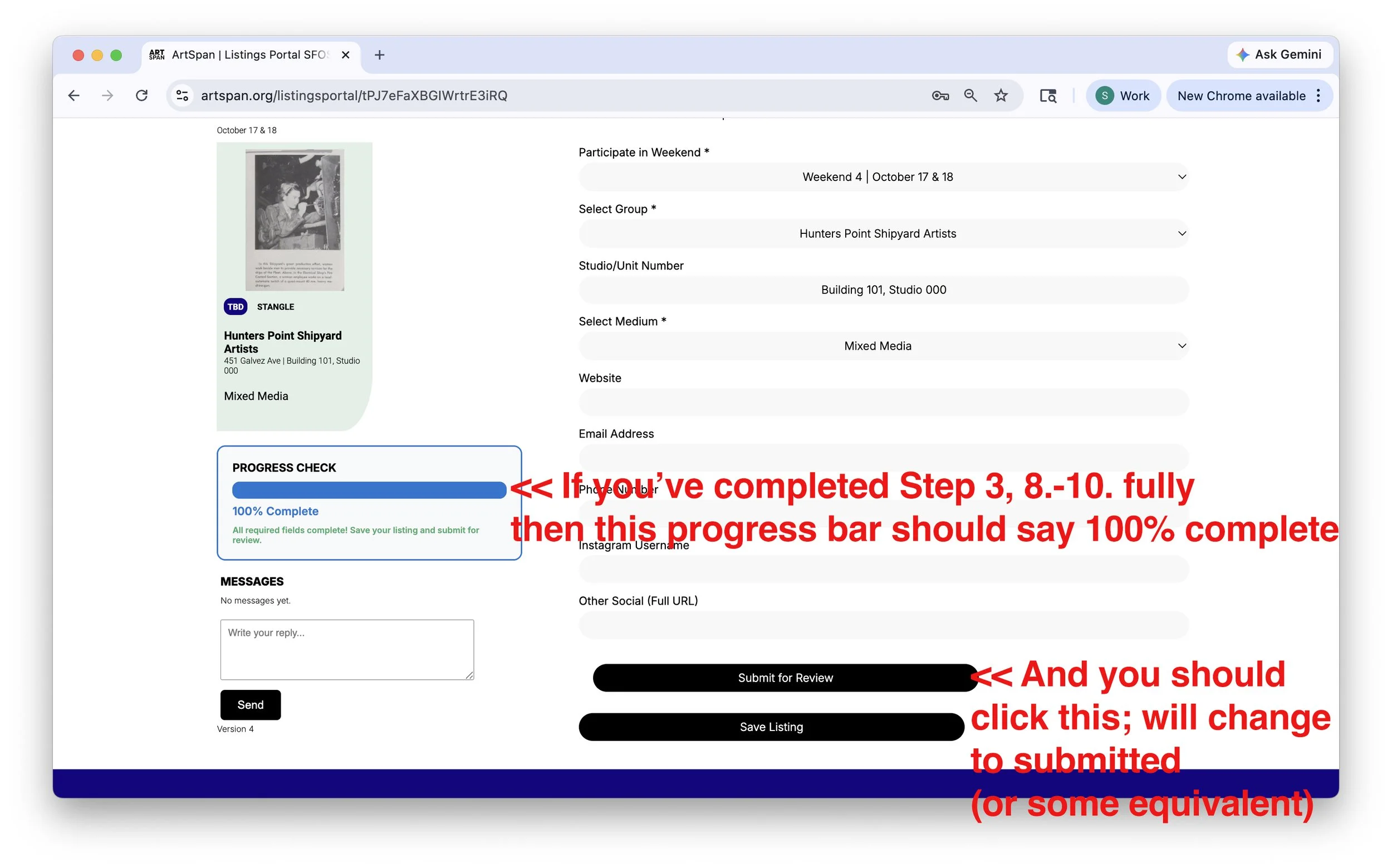
• This step is also facilitated by ArtSpan on their website. We don't have visibility into it. That said, if you sign into your ArtSpan account, go to the dashboard, click on SFOS Listing on the left, then Listing #1, and look at this screen:
FALL OPEN STUDIOS 2026
SF Open Studios Exhibition at SOMArts
On view September 18 - September 27
Eligibility and Registration
• In order to be eligible for the exhibition Shipyard Artists must complete the registration steps above by May 15.
• Eligible artists must reserve space in the exhibition to be included.
• Exhibition reservation forms (and instruction) will be directly emailed BY ARTSPAN STAFF to eligible artists in mid-June.
Additional Info and Details
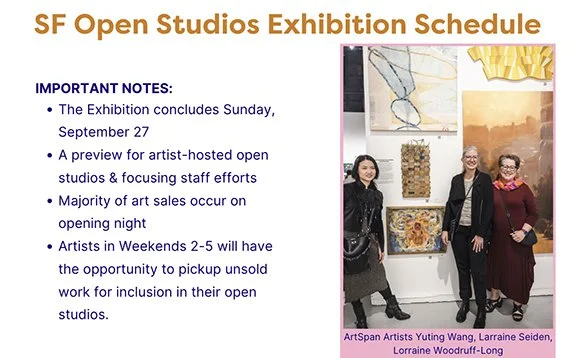
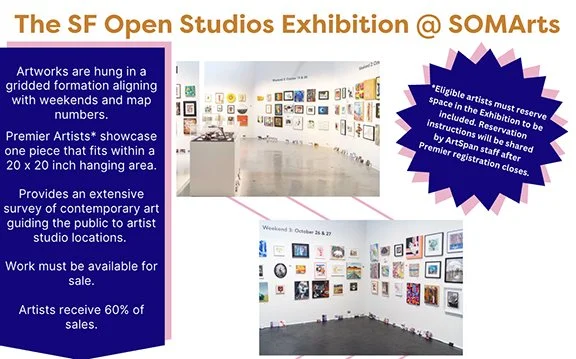
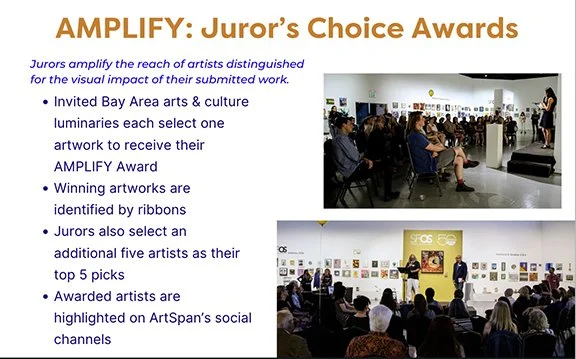
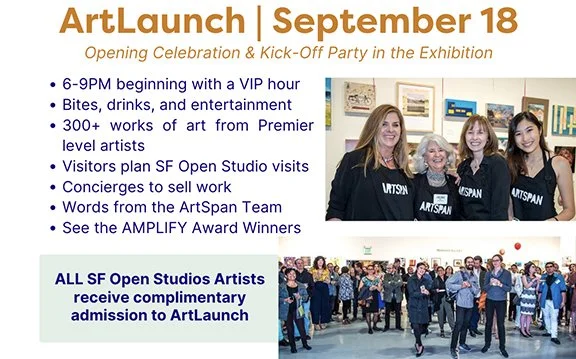
Below are some slides from an ArtSpan deck with more info and details about the exhibition:
CONTACT EMAILS
website@shipyardtrust.org - to get help with your website representation on shiyardartists.com
openstudios@shipyardtrust.org - any other questions about signing up, ads, donating to auction, anything Shipyard Open Studios.
sfopenstudios@artspan.org - any questions about signing up with ArtSpan or their requirements or activities.